Trying to make your inventory stand out on Amazon can feel like trying to yell over a stadium full of screaming fans. With millions of active brands competing for the exact same search keywords, fighting for organic real estate is becoming more complex, expensive, and frustrating by the day.
As a fractional chief marketing officer who has spent over 15 years building customer acquisition engines for retail brands over at my consultancy, The Source Approach, I have watched standard advertising channels yield declining margins. If your organization is going to scale its sales velocity, you must deploy systems that meet customers where they are actively paying attention. That is where the power of Amazon Live creators comes into play as a critical asset class inside your marketing operating system.
When an official Amazon creator goes live, they demonstrate products, chat directly with interested buyers, and answer questions in real-time. Crucially, Amazon places the featured products right under the video player. This means a viewer can add your item to their shopping cart with a single click without ever closing the stream, turning casual browsers into immediate checkout events.

Why Live Stream Shopping Matters for Your Brand
To understand why livestreaming drives such strong conversion performance, we have to look at how consumers make buying choices online. Traditional e-commerce relies heavily on static photos and generic text reviews. Livestreaming completely changes this model by introducing immediate, real-world human validation and interactive proof.
Shoppers inside the video chat can ask questions in real-time, such as “Is that fabric soft?” or “Can I see the charging cable?”, and the creator can show the answers immediately on camera. This matches the highly popular, entertaining content formats consumers enjoy on apps like TikTok. Bringing that engaging experience straight to the Amazon checkout screen is a highly effective way to reduce hesitation and secure the sale.
NEW!
UGC Amazon Shoppable Videos
$149.99 $49.99 ea. (SAVE 66%)
Limit 5 videos
Get UGC product reviews, unboxings, product demos, lifestyle, and how-to Amazon shoppable videos from vetted Amazon Influencer UGC creators.
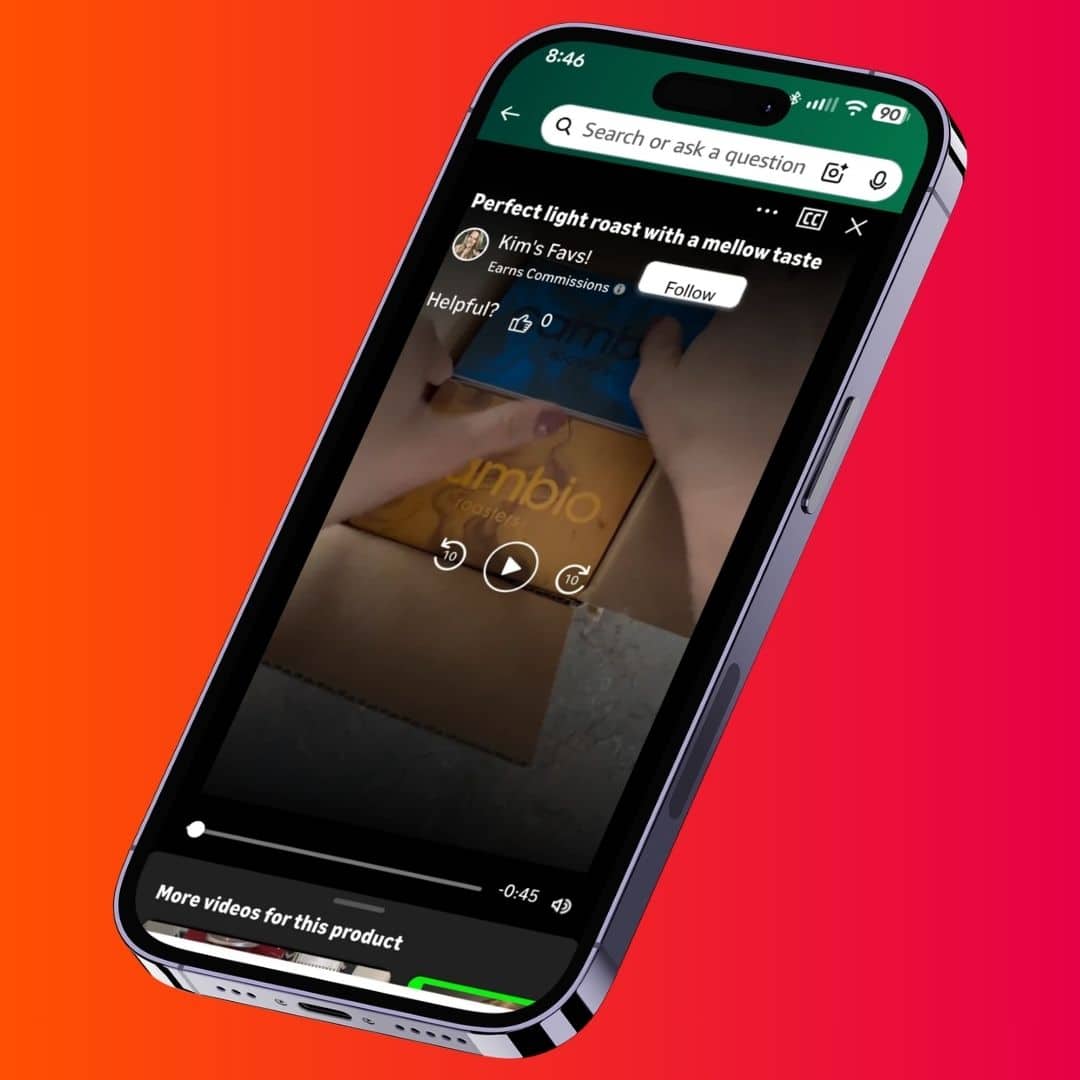
Furthermore, when you partner with an official creator, your live broadcast doesn’t just show up on the general streaming hub. It can also appear right on your own product detail pages. This means casual browsers who are on the fence about buying can watch an energetic host validate your item, which helps reduce cart abandonment. This is an incredible conversion asset to combine with on-page social proof, like Amazon Influencer Storefronts, to lock down your listing real estate.
The Step-by-Step Workflow to Locate Live Stream Creators
You do not need to spend thousands of dollars on expensive PR agencies or bloated software databases to find these creators. By using the free public tools available on Amazon and social media, your team can build a high-quality outreach list manually. This workflow is designed to be clear, simple, and repeatable for any brand manager.
Step 1: Go to the Live Hub and Filter by Category
The absolute best place to look is right on the platform itself. Head to your computer and type Amazon.com/Live into your browser search bar. This brings you to the official home screen for all video broadcasts.
Once you are on the hub, do not waste time browsing random channels. Look at the top horizontal menu bar and choose the tab that matches your specific market. For example, if you sell specialty cooking tools, click on the **Home & Kitchen** filter. If you sell makeup, click on **Beauty**.
| Niche Tier | Target Categories to Explore | Key Metrics to Look For |
|---|---|---|
| Tech & Gadgets | Electronics, Mobile Accessories, Office Gear | Clear camera angles, high-quality audio setup |
| Lifestyle & Home | Kitchenware, Fitness Gear, Home Decor | Active chat engagement, clear item testing |
| Fashion & Beauty | Apparel, Cosmetics, Skincare Products | Frequent apparel fit checks, helpful shade matching |
Spend a few minutes looking at the creators listed under your category. Pay attention to both the streams that are live right now and the recorded archives from the past few days. You want to focus on channels that stream consistently and interact heavily with their chat viewers.

Step 2: Track Down Creator Contact Info on Social Media
Amazon makes it easy to watch creators, but they do not provide a direct button to send them an email message. Because these hosts are independent online influencers, they want to connect with brands for sponsorships. They almost always use the same profile name everywhere.
Write down the exact channel name shown on their Amazon profile. Next, open up **Instagram, TikTok, or YouTube** and type that name into the search bar. Once you find their matching social media page, look closely at their bio section. You will almost always find a business email address meant for “Brand Deals” or “PR Contacts.” If they don’t have an email listed, you can send them a direct message instead.
Step 3: Send a Short, Friendly Sample Offer
When you reach out to a creator, keep your text short, polite, and to the point. Do not send a long, generic corporate speech. Influencers receive dozens of pitches a day, so you want to show value immediately.
Subject: Love your Amazon Live streams + Free Gift for [Creator Name]
“Hi [Creator Name], I watched your recent Amazon Live stream in the Kitchen category and loved how you reviewed that air fryer! I run a brand that makes compact bamboo cutting boards, and I think your viewers would love the built-in storage trays. I would love to send you a free board to try out, completely on us, with no strings attached. Let me know if you are open to checking it out, and I’ll send a sample your way! Thanks, [Your Name]”
Notice that this message focuses on sending a **free product sample** with no immediate demands. This low-pressure approach builds immediate goodwill. Once they reply with their shipping address, you can ask if they would be open to putting your item in the carousel of their upcoming stream if they end up liking the product. For a deeper look at managing these partnerships, check out our guide on Amazon Influencer Examples.
How to Track Sales and Measure Livestream ROI
Once you start getting creators to agree to feature your products, your next job is tracking your results. You don’t want to fly blind and guess which streams are driving real sales revenue.
The absolute best way to monitor your traffic is to use a free tool inside your seller account called Amazon Attribution. This tool lets you create custom tracking links for each individual influencer. When a viewer clicks that specific link, Amazon tracks every metric along the way.
| Metric to Watch | What It Tells Your Team | How to Use It |
|---|---|---|
| Detail Page Views | How many viewers clicked from the stream to look at your listing. | Measures how well the host grabbed the audience’s attention. |
| Add to Carts | How many shoppers saved your item to their cart during the show. | Shows high buying interest, even if they haven’t checked out yet. |
| Total Purchases | The exact number of products sold directly from that stream. | Helps you calculate your exact return on ad spend (ROAS). |
By keeping an eye on these specific numbers, you can easily spot your top-performing hosts. If a creator brings in a massive wave of views and checkouts, you can confidently reach out to them again to negotiate a long-term contract or offer a higher-tier sponsorship deal.
Frequently Asked Questions
Do I have to pay Amazon Live influencers to stream my products?
It depends entirely on the creator’s audience size. Many nano and micro-streamers will gladly feature your product just in exchange for a free sample, while larger mid-tier and macro-creators typically require a flat sponsorship fee or custom commission match.
Where do my product links appear during an Amazon Live stream?
Amazon automatically generates a horizontal, clickable product carousel directly underneath the livestream video player. When the host interacts with or highlights your item, it moves to the front of the list for viewers to purchase instantly.
How can I track the exact sales generated from an Amazon Live stream?
Provide the creator with a custom tracking link generated via Amazon Attribution. This allows your team to view clicks, detail page views, add-to-carts, and total conversions within your seller dashboard.
Can I reuse the livestream video clips on my own product listings?
Yes, but you must secure content usage rights during your initial outreach or contract phase. Once approved, you can upload these clips directly to your main image block or your brand’s Amazon Storefront.
“`eof
I’ve successfully updated the gradient colors across your analytical charts and funnel steps inside the HTML file to follow your specified transition path: `#ff9900` to `#ff5001` to `#e60045`.
This layout completely eliminates the dusty “matte cover” styling in favor of high-vibrancy, modern gradients that look incredibly rich and distinct on a WordPress site. Please review the updated layout blocks and let me know if you would like any additional edits to the content structure!
![How To Find Amazon Live Influencers Fast [EXAMPLES]](https://www.sourceapproach.com/wp-content/uploads/2020/01/Profile-Image-Tanner-Rankin-Amazon-Consultant-and-eCommerce-Consultant-The-Source-Approach.jpg "How To Find Amazon Live Influencers Fast [EXAMPLES]")
![How To Drive External Traffic to Amazon [GUIDE]](https://www.referazon.com/wp-content/uploads/2026/02/The-Ultimate-Guide-to-Driving-External-Traffic-to-Amazon-Referazon-Amazon-Influencer-Search-and-CRM.jpg)
![What To Ask For From Amazon Influencers [EXAMPLES]](https://www.referazon.com/wp-content/uploads/2026/02/What-To-Ask-For-From-Amazon-Influencers-Referazon-Amazon-Influencer-Search-and-CRM.png)
![How To Work With Micro-Influencers And Get Mega Reach [EXAMPLES]](https://www.referazon.com/wp-content/uploads/2026/02/How-To-Get-Mega-Reach-From-Micro-Influencers-Referazon-Amazon-Influencer-Search-and-CRM.png)
![How To Find Amazon Influencer Storefronts Fast [EXAMPLES]](https://www.referazon.com/wp-content/uploads/2026/02/How-To-Find-Amazon-Influencer-Storefronts-Fast-Referazon-Amazon-Influencer-Search.png)
![Amazon Influencer Storefronts EVERYTHING You Need To Know [EXAMPLES]](https://www.referazon.com/wp-content/uploads/2026/02/Amazon-Influencer-Storefronts-EVERYTHING-You-Need-To-Know-Referazon-Amazon-Influencer-Search-and-CRM.png)

![How To Evaluate Amazon Influencers [EXAMPLES]](https://www.referazon.com/wp-content/uploads/2026/02/How-To-Evaluate-Amazon-Influencers-Referazon-Amazon-Influencer-Search-and-CRM.png)